Sony Vegas Pro 11 Professional Video, Audio and Blue-ray Disc Creation! Vegas software combines real-time SD, DV, and HDV video editing with unrivaled audio tools to provide the ultimate all-in-one environment for creative professionals high-definition and high-fidelity. With its unique, visual approach to digital video and audio production, Vegas Pro will deliver tremendous power, incredible speed and maximum productivity in an efficient and uncomplicated platform.
The Vegas Pro 11 collection Vegas Pro 11, DVD Architect Pro 5.2, and Dolby® Digital Professional Encoder provides an efficient, intuitive and integrated content creation environment for video and broadcast professionals. With innovative stereoscopic 3D tools, broad format support, unparalleled audio control, and GPU-ignited effects processing and rendering, the Vegas Pro 11 collection streamlines your workflow like never before.
Changes in Version 11:
Video
- GPU-accelerated video processing (please see System Requirements for information about supported hardware).
- New Titles & Text plug-in.
- Improved usability for the ProType Titler.
- Added a new Star Wipe transition.
- Added a new Radial Pixelate video plug-in.
- Added per-parameter keyframes for many video plug-ins.
- The Transitions, Video FX, Media Generators, and (new) Compositors windows all include folders to group plug-ins and a search box to help you find plug-ins easily.
- The Stabilize plug-in has been simplified and improved.
- The Stereoscopic 3D Adjust plug-in now includes Floating Windows controls to allow you to mask the edge of the video frame to compensate for screen-edge violations.
- Added a Stereoscopic 3D depth control to the Cookie Cutter effect, as well as Cross Effect and Iris transitions.
- Support for NVIDIA 3D Vision on single-display systems using the Windows Graphics Card device (available in Preferences > Preview Device).
- Event Pan/Crop is now integrated into the Video Event FX dialog.
- Audio
- Improved usability for the Mixing Console.
- A simplified Master Bus window provides you with a streamlined view of your project master output.
Workflow
- Sync links provide an additional method of keeping events synchronized: a linked event retains synchronization when the event it is linked to is moved but can be moved independently.
- An updated Render As dialog streamlines the rendering process and makes it easy to manage your favorite render templates.
- Integrated Upload to YouTube.
Formats
MainConcept AVC/AAC improvements:
- Added MP4 templates for Internet distribution.
- Added an Enable progressive download check box to the Video tab of the Custom Settings dialog to allow your videos to begin playing during download.
- Added support for GPU-accelerated rendering.
Added support for RED EPIC clips
Sony Vegas PRO 11 (64bit)
 Sony Vegas PRO 11 (32bit)

Nero Multimedia Suite 10 excels your multimedia power with a collection of three products bundled into one powerful suite. It loaded with advanced video editing features, media organizer and player, superior burning software, reliable backup technology, and special multimedia tools to enhance your music, photos and videos.
Burning with Nero Burning ROM
- Ensure your discs are readable regardless of scratches, age, or deterioration with SecurDisc technology
- Drag and drop files to burn and copy to CDs, DVDs and Blu-ray Discs or save disc images
- Split oversized files to burn onto multiple discs
- Add extra security protection to your data by adding personal passwords and encryption
- Experience superior playback quality from your burned content
- Make flawless copies of your discs with reliable, uninterrupted burns
Backup with Nero BackItUp & Burn
- SecurDisc technology Ensure data readability, increase the chance of retrieving your files, protect your data from unintended alterations, and verify the originator of the data
- Easily back up data to hard drive, CD, DVD, Blu-ray Disc, FTP, memory card and online storage
- Restore personal data after a computer crash or accident
- Recover deleted and damaged files from hard drives, CDs, DVDs, flash storage and floppy discs
- Back up files and folders to multiple devices at once
- One-click Autobackup without reconfiguring computer settings
Nero Multimedia Suite 10 + Key

Highlights:
Video Editing with Nero Vision Xtra
- Search quickly, play back and easily arrange all your music, photos and videos all in one place
- Utilize cutting-edge video editing tools (picture-in-picture, full keyframe control, master effect track and assorted special effects and transitions) in a true multi-track timeline to achieve advanced personal touches
- Create High Definition DVD, and Blu-ray Disc movies using SmartEncoding for faster HD video output, and author Blu-ray Discs with 24 progressive frame high-quality cinema-style format
- Media player for all most popular audio, video and photo formats such as AVCHD, MKV, FLV, FLAC, DVD, MPEG-4 AVC, (S)-VCD, AVCREC and Audio CDs, plus music playlists and slideshows
- Burn music, photos and videos to CDs, DVDs, and Blu-ray Discs, or share to social communities
Minimum system requirements for Nero Multimedia Suite 10
- Windows XP SP3 (32bit), Windows Vista SP1 (32 and 64bit), Windows 7 Home Premium, Professional or Ultimate (32 and 64bit)
- 2 GHz AMD or Intel processor
- 512 MB RAM (1 GB RAM for Windows Vista or Windows 7)
- Â5 GB hard drive space for a typical installation of all components (including templates, content and temporary disk space)
- DirectX 9.0 compliant graphics card with 3D acceleration, 16-bit color, and a minimum of 128 MB video memory is required (32-bit, true color, 256 MB dedicated video RAM, and support for Shader Model 3.0 is recommended)
- ÂDVD disc drive for installation and playback
- CD, DVD, or Blu-ray Disc recordable or rewritable drive for burning and video authoring
- DirectX 9.0c revision 30 (August 2006)
- Windows Media Player 9
- Third party components such as Microsoft Windows Installer 4.5, Microsoft .NET 3.5 SP1 and Microsoft Silverlight 3 are shipped with the product or automated download if not included in the package
- For some services an Internet connection is required (DSL-1000 and higher recommended). Internet connection charges are the user's responsibility
Note:
- On 64-bit operating systems, applications run in 32-bit emulation mode
- Nero DiscCopy Gadget does not run on 64-bit operating system
- The devices must be correctly installed and recognized by the operating system for the product to work properly
- Installation of the latest WHQL certified device drivers is strongly recommended
Special / Minimum requirements for video editing and authoring
- OHCI compliant FireWire controller (IEEE 1394) for DV or HDVâ„¢ capturing
- TV tuner or video capture card for analog and digital video recording
- Up to 50 GB hard drive space for disk images and temporary files
Special / Minimum requirements for working with high-definition video content
- Intel or AMD dual core processor with at least 2 GHz
- 2 GB of RAM
- For support of AVC NVIDIA CUDA technology an NVIDIA CUDA capable graphics card must be installed.
- For more information see: http://www.nvidia.com/object/cuda_learn_products.html
- For playback of copy-protected video content, an appropriate hardware/software setup is required
Special / Minimum requirements for backup
- A hard drive formatted in NTFS is required for the use of certain backup/restore features
- Broadband Internet access is required for backups to Nero Online Backup
Special / Minimum requirements for LightScribe and Label flash
- LightScribe compatible recorder and medium.
- LightScribe host software must be installed.
- Labelflash compatible recorder and medium.
Smadav Pro 17 is antivirus for additional protection of your computer, USB stick total protection and thoroughly cleaning widespread virus.it stops apps from being running in background (Without your permisions).
Just check this app as its one of the awesome apps.SmadAV Pro can perform an automatic update with an internet connection whenever there is a new revision.
SmadAV will install new revisions automatically without user command. Unlike the Free SmadAV, you still have to do the update manually by downloading the new revision in Smadav.net and open the program first SmadAV to update SmadAV on your computer.Smad-Turbo can be activated to speed up the scanning process.
SmadAV perform filtering by file type so SmadAV only scan the files were most likely infected with a virus.
This feature is very effective in accelerating the process of scanning without compromising the ability of detection
Nero Burning ROM 17 has remained an easy-to-use burning program that creates discs in just a few steps. You select the disc type to be burned (CD/DVD/Blu-ray), define the project type, add the required data and then start burning.
Using Nero Burning ROM you can save audio files from an Audio CD to the hard drive. In the process, the files are encoded, i.e. converted into a format that the computer can read. The Audio CD can be automatically identified with Gracenote. So called metadata such as title, genre, and track title are accessed by the Gracenote Media Database and associated to the tracks. That way you have audio files that are accurately and fully named after the encoding process.
Nero Burning ROM FINAL 17 + Serial and Crack

Supported media formats for burning data:
- CD-R
- CD-RW
- DVD-RAM
- BD-R
- BD-RE
- BD-R DL
- BD-RE DL
- BD-R TL (BDXL)
- BD-RE TL (BDXL)
- BD-R QL (BDXL)
- BD-RE QL (BDXL)
Supported disc formats:
- Data CD (ISO, UDF, ISO/UDF)
- Data DVD (ISO, UDF, ISO/UDF)
- Blu-ray data disc (ISO, UDF)
- Disc SecurDisc CD/DVD/Blu-ray
- Nero DiscSpan (UDF)
- Audio CD
- CD mixed mode
- CD EXTRA
- The image of Nero (NRG)
- The ISO image
- DVD-Video
- Video BDMV
Create your best photos ever with new Corel PaintShop Pro X7 With smarter editing features, 30% faster brushes, new creative tools and easier color selection, this complete photo-editing software helps you turn your snapshots into beautiful, gallery-worthy images. A great fit for all skill levels, PaintShop Pro X7 brings out the best in your photos that matter.
What Are New Features Corel PaintShop Pro X7
- New! Magic Fill
- New! Faster brushes
- New! Text and Shape Cutting
- New! Color Materials palette
- New! Image dialog
- Enhanced! Redesigned dialogs
- New! Quick Preview For Instant Effects
- New! Smart Edge
- New! XMP support
- Enhanced! Layer workflow
- 64-bit power
- Auto Selection
- Smart Selection Brush
- User-friendly design
- Video learning
- Fast High Dynamic Range (HDR) tools
- Corel PaintShop Powerful scripting engine
- Support for third-party plugins
- RAW support
- Easy Layer creation
- Smart Carver
- Object Extractor
- Comprehensive, 1-2-3 photo editing
- Amazing portrait retouching
- Easy-to-use selection tools
- Smart Photo Fix
- Retro Lab
- Graduated Filter effect
- Instant Effects
- Selective Focus
- Single RAW Photo
- RAW image processing
- Versatile creative design features
- Painting and drawing tools
- Easy built-in learning
- Complete photo editing for the video enthusiast
- Find People
- Photo Mapping
- Extensive file support
- Customized workspaces
- Customize your photo
- Web tools
- Amazing photo restoration
- Comprehensive text tools
- KPT Collection
Corel PaintShop Pro X7 17.0 (keygen CORE)
System Requirements
- Microsoft Windows 8/8.1, Windows 7, Windows Vista or Windows XP with latest service packs installed (32-bit or 64-bit editions)
- Intel or AMD 1.5 Ghz processor with SSE2 supported (multi-core processer recommended)
- 2 GB RAM (4 GB or higher recommended)
- 1 GB hard disk space (2 GB recommended)
- 1024 x 768 resolution with 16-bit color display (1366 x 768 resolution with 24-bit or higher color display recommended)
- DirectX 9 or higher compatible audio card with latest driver
Languages :
English, Chinese traditional, German, Spanish, French, Italien, Japanese, Dutch, Russian

Eye Candy 7 renders realistic effects that are difficult or impossible to achieve in Photoshop alone, such as Fire, Chrome, and the new Lightning. Effects like Animal Fur, Smoke, and Reptile Skin are rendered in exquisite detail down to individual hairs, turbulent wisps, and shiny scales.
Eye Candy helps you quickly explore and design looks. In Eye Candy 7, effects are chosen through easy to recognize icons rather than text menus. Presets are rapidly previewed by simply mousing over them. The theme is less clicking and more visual browsing.
What's New in Alien Skin Eye Candy 7:
Even Easier
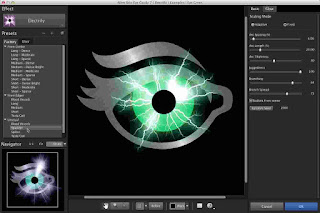
We completely rewrote the Eye Candy user interface to make it easier to explore. The theme is less clicking and more visual browsing. Eye Candy 7 is now a single entry in Photoshop’s filter menu. That means that you can explore all of our effects without leaving the Eye Candy window. Instead of choosing an effect category by reading a text list, you’ll see icons that show typical uses of each effect. Click the image below to see the full size as it appears in Eye Candy 7.
Alien Skin Eye Candy 7.1 (x32x64) Photoshop Plugin
New Effects
By popular demand, we rescued the best effects from our discontinued Xenofex product: Lightning, Electrify (seen above), and Clouds. We rewrote them for our new Eye Candy 7 framework, which provides faster previewing, better preset management, and easier experimentation.
Realistic Effects
Realism sets Eye Candy effects apart from the generic filters built into Photoshop. Effects like Animal Fur, Smoke, and Reptile Skin are rendered in exquisite detail down to individual hairs, turbulent wisps, and shiny scales. Eye Candy helps designs look natural and organic.
Adaptation
Eye Candy scales effects to match the size of your current artwork. That makes it less likely that you will have to tweak a preset to make it look good.
Non-Destructive Editing
Effects are drawn into a new layer, leaving your original artwork untouched. Eye Candy can also work as a Smart Filter, which lets you modify or remove the effect later. You can save presets to consistently recreate your favorite looks.
Professional Features
Eye Candy can handle images in CMYK mode and 16-bits/channel, which are needed for professional print work.
Info:
- Disconnet net
- Install
- Copy Crack to the install dir
- Run keygen and select Eye Candy 6, copy license code
- Run PS, open image, go to plugin
- Paste license code, copy Installation ID to keygen and generate serial.
The Exposure X2 Bundle is a photo editor and organizer that integrates all of Alien Skins award-winning photo editing apps into a single product.. The centerpiece of the bundle is Exposure X, the editing app that streamlines your workflow and provides a rich set of creative tools. Two additional apps expand the creative possibilities: Blow Up 3 enlarges your photos into large prints with the sharpest resizing technology available, and Snap Art 4 transforms your photos into gorgeous, handcrafted paintings.
Creative
Transform your digital images into evocative works of art using the rich creative tools in the Exposure X Bundle. Hundreds of carefully curated styles bring a human touch to your work. Personalize these looks using robust editing tools and natural media effects like oil paint and watercolor.
Alien Skin Exposure X2 Bundle 1.0 Revision 34835 Inc Keygen
Simple
Experience a simpler, smarter way to work. The Exposure X Bundle streamlines your workflow, so you spend your time making creative decisions, not learning complex software. You won’t encounter complications like catalogs or imports. It’s easy to switch between edits in Exposure and those using natural-media and image-enlargement tools.
Flexible
Work how you want — the Exposure X Bundle will adapt. It has the tools you need in a professional, standalone photo editor. It also works great as a series of plug-ins for Lightroom or Photoshop. Exposure edits your RAW files nondestructively, and provides powerful organizing tools, a customizable UI, and speed. Industry-leading image enlargement tools enable you to deliver large prints that are crystal clear.
What's New in Alien Skin Exposure X2 Bundle 1
http://www.alienskin.com/exposure/features/
System Requirements:
- Apple Mac users need OS X Yosemite (10.10) or newer
- Microsoft Windows users need Windows 8 64-bit or newer
- An Intel Core 2 processor or compatible
- A monitor with 1280×768 resolution or greater
The plug-in requirements are as follows:
- Adobe Photoshop CS6 or Adobe Photoshop CC 2015 or newer
- Adobe Lightroom 6 or Adobe Lightroom CC 2015 or newer

Alien Skin Snap Art 4 turns your photograph into a beautiful work of art that looks completely handmade. Improved realism in version 3 keeps your subject natural and recognizable. The result is a finished piece worthy of printing on canvas and hanging in a gallery.
Using Snap Art just requires a creative idea, not hand-eye coordination or technical training. Simply choose from hundreds of styles such as oil paint, watercolor, pencil sketch, or the new crayon. If you need more control, the new detail mask letâ?™s you quickly mark areas where you want the subject to be clearer.
Features
Snap Art 4 turns photos into art that looks completely natural and handmade.
To use Snap Art, you will need to have one of the Adobe products Photoshop, Photoshop Elements, or Lightroom. See the requirements for details and watch our videos to see how Snap Art works in these programs as a plug-in.
Lightroom Support
Snap Art 4 has tight Lightroom integration that supports batch processing and does not require Photoshop.
Alien Skin Snap Art 4.0 (32 - 64 bit)

NEW! Improved Realism
Version 4 uses more refined stroke placement to keep edges sharp and reproduce natural texture. This keeps the subject natural and recognizable. If you used Snap Art in the past then you will notice dramatically clearer results, especially on portraits.
NEW! Detail Mask
Instead of oval focus regions, Snap Art 4 now has a detail mask. This lets you quickly mark exactly where you want more detail. This is great for leaving backgrounds abstract while faces are detailed and natural.
Wide Range of Media and Styles
Snap Art can draw with a wide range of physical media, such as oil paint, watercolor, pencil, and charcoal. Within those, you can choose from a plethora of styles like impasto, pointillism, or modern art techniques like comics and stylize.
NEW! Crayon and Improved Presets
We added multiple crayon presets for that messy colorful look. All the presets for existing media types were remade and reorganized to be easier to use.
NEW! Everything in One Place
Snap Art went from ten filters to just one. Now you can explore all of the media types and styles in one place without switching filters. The entire user interface is redesigned for easier exploration. The presets are always visible on the left, there is a huge preview in the center, and you experiment with your style on the right.
NEW! Hidden Complexity
There are now presets that control groups of related sliders. This lets you quickly experiment with one aspect of the art, such as color scheme, without having to manipulate four different sliders. We also hid the more esoteric sliders by default so you can focus on just the most important controls.
Non-Destructive Editing
Snap Art supports a non-destructive workflow, making experimentation easy. Effects in Photoshop are rendered on a new layer, leaving your original image untouched. In Photoshop, Snap Art can be run as a Smart Filter for easy tweaking of the effect after it is created.
System Requirements
- Windows: Pentium 4 processor or compatible and Windows XP SP3 or newer
- Monitor: 1024x768 resolution or greater
Host Requirements:
Snap Art 4 is a plug-in and requires one of the following host applications:
- Adobe Photoshop CS4 or newer
- Adobe Photoshop Elements 8 or newer
- Adobe Photoshop Lightroom 2 or newer
Language : English
The professional image-editing standard and leader of the Photoshop digital imaging line
Adobe Photoshop CS5 Extended provides excellent opportunities for selection, retouching, and paint realistic images, as well as the creation of 3D-shapes.
Many new features help save time and increase productivity raboty.S easily select the complex field. Remove any elements of the image moments of intellectual filling the
empty field. Draw realistic illustrations. Create striking images HDR, Eliminate noise, add grain and adjust vignetting using the most modern tools for photo editing.
What's New in This Release:
Complex selections made easy:
Select specific areas within an image in fewer clicks. Easily select intricate image elements, such as hair; eliminate background color around selection edges; and automatically vary selection edges and perfect masks
using new refinement tools.
Adobe Photoshop CS5 Extended Multilingual Portable Final
Content-Aware Fill:
Remove any image detail or object and watch as Content-Aware Fill magically fills in the space left behind. This breakthrough technology matches lighting, tone, and noise so it looks as if the removed content neverexisted.
Superior HDR imaging:
Photoshop CS5 Create photo-realistic or surreal HDR images with unprecedented speed, control, and accuracy. Get better-than-ever results thanks to automatic ghost removal and greater control with tone mapping and adjustments,and even give single-exposure photos the look of HDR.
Extraordinary painting effects:
Easily change a photograph into a painting or create unique artistic effects with the Mixer Brush, which offers on-canvas color blending, and Bris...
Requirements:
Windows OS
- 1.8GHz or faster processor
- 512MB of RAM (1GB recommended)
- 1GB of available hard-disk space for installation; additional free space required during installation (cannot install on flash-based storage devices)
- 1,024x768 display (1,280x800 recommended) with 16-bit video card
- Some GPU-accelerated features require graphics support for Shader Model 3.0 and OpenGL 2.0
- DVD-ROM drive
- QuickTime 7.2 software required for multimedia features
- Broadband Internet connection required for online service
How To Install
1. Unpack.
2. Run Auto paf portable Installer.
3. Choose language.
4. Install it at desire location.
5. Run PhotoshopCS5Portable.exe

Wondershare Filmora 6 an easy-to-use video editor with all the video editing tools you need, enables you to create Hollywood-like home movies with titles, effects and transitions from all regular videos, audio and photos. Share instantly with family and friends with easy upload to YouTube,etc. Save videos to play on portable devices like iPhone, iPad, iPod, etc. or burn DVD for better video preservation. No matter its a wedding video, love movie, travel story, life documentary or party record, it is just so easy to turn it to a treasured home video and share it with everyone!
Edit and Enhance Your Media Files
Easily make perfect movies using your video clips (SD, HD, camcorder, records), audio and photos. See tech spec. for all supported formats.
Edit and personalize videos/photos/audio with features like split, crop, trim, rotate, set fade in & fade out, adjust duration, etc.
Tune all up with Contrast, Saturation, Brightness and Hue tools.
One click to record videos and voiceovers with a webcam and microphone.
Speed up, Slow down and voice change effects make audio/video editing fun.
Manage all your media sources including videos (also webcam), audio, images and color slides.
Wondershare Filmora 6.8 Multilingual + Keys
Edit and Enhance Your Media Files
Filmora 6 Take your movie to the next level instantly with 50+ ready-to-use filter effects.
Add transitions between clips and apply motion effects to photos to bring still images to life.
Easily achieve picture-in-picture (image/video overlay) tracks and customize with motion, effects and mask. New
Add stylish captions on your videos and photos with customizable font, color, etc. for better video meaning conveying.
Drag and drop Intro/Credit clips for a great film.
Share Your Videos with Family and Friends in a Snap
DEVICES: Get optimized videos for playback on your portable devices like iPhone, iPad, PSP, iPod, Wii, Zune, etc.
FORMATS: Save edited videos to local hard drive for further use in a variety of video formats.
ONLINE: Directly upload your video creation to YouTube, and share with more people onand Twitter.
TV: Burn videos to DVD discs to play with DVD player or save as DVD folder or ISO image files to preserve videos in a better way.
What's New:
- New UI for rebranding
- Smart thumbnail previews
- New effects and categories
- Adds the ability to archive project file for transferring between PCs and avoid media file missing;
- Adds the ability to relocate missing media in saved project, resolved the issue of project unable to save in some cases;
- Adds the ability to import Media directly from AVCHD camcorder and Mobile phone(iOS, Android)
- Timeline UX optimization for resolving the too easy to cut clip into two parts when move clips on Timeline issue
Insructions:
1. Unpack and install
2. Use given serial to register and any email
3. Block all out going connections with firewall
4. Done
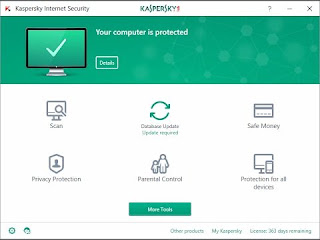
Kaspersky Internet Security is an antivirus protection software, that effectivelly defenses your PC from malware. Kaspersky Internet Security 16 keeps your PC safe from all viruses and Internet threats. It is a full security solution that rigorously protects your files and your identity from cyber criminals and the latest malware attacks. Kaspersky Total Security 16 Multi-Device (replaces Kaspersky PURE) delivers the ultimate security for computers and mobile devices. It protects your privacy, money, identity, photos, files and family against Internet threats, cybercrime and malware – so no aspect of your digital security is left to chance.
What's New In Version 16:
Kaspersky Internet Security 16 Core Protection:
- Real-time Protection defends against new and emerging viruses, spyware and more
- Hybrid Protection combines the power of the cloud and your device
- Instant Safety Checks examine files and websites
- Gamer Mode helps you enjoy an uninterrupted gaming experience
- Free, Automatic Updates and Upgrades ensure you always have the latest version of your Kaspersky security product
Kaspersky Internet Security 16 Advanced Protection:
- Improved! Two-Way Firewall prevents hacker attacks
- Improved! Application Control prevents dangerous applications from harming your system
- Safe Surf alerts you to potentially malicious web sites
- URL Advisor informs you about the reputation and security of website links
- Improved! Trusted Applications Mode ensures only trusted applications are allowed to run on your PC
- System Watcher technology secures your PC from malware dangerous behavior and enables the malicious actions roll back
- New! Change Control helps prevent the installation of unwanted programs and browser settings
- Network Attack Blocker prevents malicious network attacks
- Anti-Banner blocks dangerous and annoying banner adverts
- Anti-Spam protects you against spam messages
- Advanced Parental Control keeps your children safe and responsible online
Kaspersky Internet Security 16 Identity and Financial Protection:
- Improved! Safe Money protects data during online financial transactions
- New! Private Browsing prevents tracking your web browsing habits and capturing your personal information
- Anti-Phishing defends you against phishing sites or emails that try to steal your money or your identity
- Privacy Protection allows to hide your private mobile communication from others.
Kaspersky Internet Security v16 Build 8529 + Crack

AVG continues to deliver advanced antivirus protection with the launch of AVG Internet Security 16 It goes beyond simply detecting and removing viruses on your PC by blocking infected links as you browse, checking files before they're downloaded, and helping protect your personal data online and on your PC with enhanced privacy features. With 2015, we've improved our core engine and its accuracy, and included a new cloud-based detection method. And because we know that security is just as important as usability, Internet Security 2015 features a revamped, easier-to-use design.
Weve been hard at work optimizing our core engine to increase its detection accuracy. That includes better detection of screen-locker ransomware and improved scanning of all downloadable files to keep you safe from an exponentially expanding pool of threats.
And when a new online threat breaks out and spreads, the key to keeping you protected is the speed with which we can react. Our new Outbreak Detection gives us the tools to act immediately and curtail their spread. With Internet Security 2015, you don't have to wait until the next virus-definition package is ready to be protected: the moment we know a threat's there, you're covered.
Finally, we believe security should be clean and simple to be effective, and we've put a lot of work in making sure AVG Internet Security is intuitive to use. Our new simplified design makes sure you know what needs your attention at a glance. Combined with our free comprehensive online support, you can be sure you're getting our best protection.
Key Features:
Antivirus
Blocks viruses, spyware, & other malware
Link Protection
Scans web, Twitter®, &links
File Shredder
Securely deletes files to prevent snooping
Online Shield
Protects you from harmful downloads
Data Safe
Encrypts & password-protects private files
Anti-Spam
Stops spammers and scammers
Enhanced Firewall
Blocks hackers so you can shop safely
AVG Internet Security:
- For users of the paid version, the virus database update period was shortened to 2 hours.
- Introducing new graphics of AVG main user interface.
- All Data Safe user settings will be preserved after program upgrade to version 2015.
- Suppressed display of a button with no assigned functionality in the detection dialog.
- Improved security of Firewall rule verification process.
- Fixed issue with different detection count displayed in the scan report and the history log.
- Fixed issue with possible corruption of data transferred over network.
Whats New
- A completely new installer
- Improve: Cloud-based security in real time (Real-Time Cloud Detection), which makes it easier to identify the latest threats and to better protect against malicious websites
- Other improvements
AVG Internet Security 16 (x86 - x64) + Serials
AVG Internet Security 16 (x64)

AVG Internet Security 16 (x86)
Alien Skin Eye Candy 6 is a set of 30 Photoshop filters that elegantly handle a wide range of design tasks, from slick Web interfaces to tasteful logos to spectacular titles. Realistic simulation of natural phenomena gives beautifully detailed results.
Eye Candy's simple interface makes it easy, saving you loads of time in Photoshop. Effects now adapt to your current image size,making for less slider adjusting. Over 1500 carefully designed presets are organized into categories for quick browsing.
Eye Candy 6 is made for demanding production environments with features like CMYK mode, multi-core CPU acceleration, 64-bit Photoshop support, and two custom panels for Photoshop CS4 or later. Non-destructive editing is achieved through Photoshop Smart Filters or drawing the effect on a new layer.
Host Requirements
This product requires one of the following host applications:
- Adobe Photoshop CS3 or later
- Adobe Photoshop Elements 7 or later
System Requirements Windows:
- Intel Pentium 4 processor (or compatible)
- Windows XP SP3 or later
- 1024x768 or greater monitor resolution
Alien Skin Eye Candy 6.1 (Photoshop plugin)

world's number one movie and media player, serving up the highest quality, most immersive media entertainment experience available on PC. Cyberlink PowerDVD Ultra 16 now brings this award-winning experience to your big-screen TV, with a stunning new TV Mode that lets you recreate the atmosphere of cinema in your own home.
3 Big Advantages:
- Power-up Your Casting Device: For video, audio or photo formats not natively supported by Roku®, Apple TV® or Chromecast™, PowerDVD will convert them in real time.
- Superior Quality: You can apply PowerDVD's award-winning TrueTheater technologies to anything you stream for enhanced audio-video quality.
- Wireless and Hassle-Free: Any video, music or photo format you watch on PowerDVD can be streamed to your TV through a Roku®, Apple TV® or Chromecast™ device. No cables, no fuss.
- TV Mode — Bring the Movies Home!
- PowerDVD Remote
- Better-Than-Original Quality
- Media Casting to Big Screen
- Enhanced 4K Viewing
- Cinema Quality Audio Playback
- TrueTheater — A New Depth of Engagement
- Expanded Format Support
- Fast Start-up with Instant Play
- Super-Fluid Slow Motion Action
Online Entertainment:
- By using PowerDVD 16 to enjoy videos online you can:
- Pin (download) YouTube videos to play offline
- Play pinned videos in fast-forward or slow-mo
- Group your favorite music videos as a playlist
- Upscale YouTube content to HD on-the-fly with TrueTheater HD
- Watch 2D YouTube videos in 3D with TrueTheater 3D
- Use YouTube's "Watch later" feature
Get the Look & Feel You Want
Customization options let you tailor PowerDVD to your needs. Hide Media Panel tabs to streamline the interface and tailor your player's background wallpaper.
Start Watching from Where You Left Off
Whenever you watch movies, TV series, and even view photo albums, PowerDVD will automatically remember where you finished up, and resume at the point where you last stopped watching.
System Requirements:
- Microsoft Windows 10, 8.1 / 8, 7.
CyberLink PowerDVD Ultra 16 + Keygen

Alien Skin Bokeh 2 provides a wide range of creative focus effects and accurate lens simulation in a simple interface. Photographers use Bokeh to draw attention to their subject by manipulating focus, vignette, and depth of field.
Bokeh gives you the visual language of specialized lenses without the expense or hassle. Just drop a focus region over your subject and choose a preset or easily craft your own look.
Bokeh 2 is dramatically faster, has multiple focus regions, motion blur, and a more flexible vignette.
Features
Speed!
Bokeh sports a super-fast user interface that gives you real-time feedback as you change any control. Bokeh takes advantage of multiple processors and multiple cores in order to run fast on modern computers.
Photoshop CC 64-bit Support
Bokeh 2 works great with the 64-bit version of Photoshop CS5 on both Macintosh and Windows. This gives Bokeh access to more memory and a speed boost.
Lightroom Support
Bokeh 2 now works in Adobe Lightroom 2 or newer. Our method of tight Lightroom integration provides batch processing and does not require Photoshop to be installed
Creative Lens Optics
Bokeh 2 provides many more lens simulation capabilities, including the simulation of motion-like optics found in specialized tilt-shift lenses. Bokeh 2 also simulates traditional fast lenses and also allows you to easily create artistic aperture shapes.
Alien Skin Bokeh 2.0 (x32/x64) (Keygen) (Photoshop Plugin)
Realistic Depth-Of-Field Simulation
Bokeh allows you to turn an f/22 shot into an f/1 by applying that smooth creamy blur only found in high-end fast lenses.
Aperture Creative Aperture
Create realistic or fanciful shapes in the highlights of your photographs.
Multiple Regions
Bokeh allows you combine multiple radial and planar shapes for more control over your focus region.
Grain Matching
When Bokeh is applied to a grainy photo, the blurring process will remove the existing grain structure of the image. The grain matching features allow you to replace the missing grain.
Vignette Enhancements
In addition to the darkening vignetting effect, Bokeh also provides a bleaching (desaturation) control to remove color in the vignette area. It also has the ability to apply the vignette to an area independent of the blur area.
Settings Enhancements
Bokeh comes with a slew of new factory presets to help you get great results fast. These presets are grouped into meaningful categories and you can combine presets from different groups to create your own customized effect.
Non-Destructive Editing
Bokeh supports a non-destructive workflow, making experimentation easy. Effects in Photoshop are rendered on a new layer, leaving your original image untouched. In Photoshop, Bokeh can be run as a Smart Filter for easy tweaking of the effect after it is created.
System Requirements
- Intel Pentium 4 processor (or compatible)
- Windows XP SP3 or newer
- 1024x768 or greater monitor resolution
Host Requirements
This product requires one of the following host applications:
- Adobe Photoshop CS3 or newer
- Adobe Lightroom 2 or newer
- Adobe Photoshop Elements 7 or newer

Alien Skin Exposure X 1.1 is the creative photo editor that handles every step of your workflow. From card transfer to organization to editing, Exposure simplifies routine tasks and delivers a rich set of tools for developing beautiful photos.
Creative
Exposure’s carefully researched library of styles gives your photos a human touch. Each look encompasses many subtle changes that work together to evoke emotion. Explore these visual ideas for inspiration and then quickly refine them to develop your own style.
Simple
Exposure streamlines photo management by eliminating burdensome chores. You don’t need to import photos into Exposure, so browsing is fast and easy. There are no user interface modules, which lets you edit and organize photos at the same time.
Flexible
Exposure X 1 flexible features handle any photography workflow. Use it as a plug-in for Photoshop and Lightroom, or as a complete photo editor on its own. As a standalone app, Exposure X helps you quickly edit RAW photos non-destructively.
Installation
- Install.
- Apply patcher.
- Don't close it yet! Open License Activation Tool as Admin.
- Copy and paste the serial from the launched XFORCE keygen.
- Choose other activation options. Choose to activate by mail!
- Copy installation id back to keygen and activate with the unique activation code.
Alien Skin Exposure X 1.1.0 (64-bit) Incl Patch
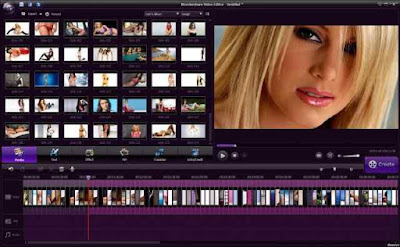
Wondershare Video Editor 5 -handy video editor, containing all the necessary tools for video editing. You can create high quality movies with subtitles, apply filters, transition effects, sound processing. In addition, the program will directly upload your videos to YouTube to share with family and friends, save videos for playback on portable devices such as iPhone, IPAD, IPod, etc., or a DVD.
Program features Wondershare Video Editor 5.1.3:
- Supports all SD and HD videos, including WMV, AVI, MP4, FLV, MOV, MKV, MTS, etc. You can also capture video directly from a video capture device or add videos from camcorders and other external hard drives directly.
- Add background music to the video. All standard audio formats like MP3, WMA, WAV, M4A, AAC, AC3, OGG, etc. supported.
- Import photos like BMP, JPG, PNG, GIF, etc. and create home movies with photos and video.
- Edit and personalize videos / photos / audio with video editing: crop, rotate, set fade in and fade, and so on to adjust the duration. D.
- Add stylish lettering on video and photos with customizable fonts, colors, etc.
- Lift the film to a new level once a professional and creative effects. 30 Filter + ready to work with video and photos.
- Add transition effects between two clips and apply motion effects to photos in order to achieve a natural and smooth transition.
- Get optimized videos for playback on portable devices like iPhone, iPad, PSP, IPod, Wii, Zune, etc.
- Save the edited video on the local hard disk for later use in a variety of video formats.
- Directly upload your video on YouTube, creating a joint with more people by filling in the required information.
- Record video to DVD disc or save as DVD folder or ISO files image.
The procedure for treatment:
1. Install the program, close it.
2. Copy the contents of the folder "crack" with the replacement in the installation folder.
Wondershare Video Editor 5.1.3 Full + Crack